S3 Vector Bucket Hands-On: Turn the Latest Lingerie Catalog into a Searchable Vector Knowledge Base with Amazon Nova
S3 Vector Bucket Hands-On: Turn the Latest Lingerie Catalog into a Searchable Vector Knowledge Base with Amazon Nova
S3, short for Simple Storage Service, is one of the earliest AWS services.
Besides file storage,
it evolved to support lifecycle policies for tiering and deletion,
and can also host static websites.
With the recent AI wave,
AWS introduced S3 Vector Bucket in 2025,
as a vector storage option.
In this article,
I will walk through
how to use S3 Vector Bucket for RAG,
and build a low-cost knowledge retrieval setup in practice.
What Is RAG?
What Is Retrieval-Augmented Generation?
Retrieval-Augmented Generation (RAG) is a way to optimize LLM outputs.
Before generating a response,
the model can reference an authoritative knowledge base beyond its training data.
Large language models (LLMs) are trained on massive datasets,
and use billions of parameters to generate outputs,
such as answering questions, translating languages, and completing text.
RAG extends an already powerful LLM with domain-specific or organization-specific knowledge,
without retraining the model.
This is a cost-effective way to improve LLM output,
and keep results relevant, accurate, and useful in real-world scenarios.
Why Is RAG Important?
Even though LLMs are already very mature,
AI hallucinations still happen from time to time.
To reduce this problem, besides fine-tuning,
another effective approach is to index existing data directly,
so search results are constrained to a known scope.
What Is Vector Data?
What Is Vector Data?
In traditional databases, we usually store scalar data,
such as age or phone number.
Those are direct values.
But some data is usually not stored directly in a database,
such as images, documents, or audio files.
After these files are analyzed by a model,
they can be transformed into a sequence of numbers like [0.12, 0.98, -0.45…].
These converted values typically represent relationships and features.
For images, for example, they may represent color and texture.
That is vector data.
What Types of Databases Are There?
Relational Databases
In web and system development,
people commonly use MySQL, PostgreSQL, Oracle, or SQL Server.
In these databases, each table has predefined columns,
columns are not dynamically expanded by default,
and relationships between tables are expressed through constraints.
Databases with these characteristics are relational databases.
Non-relational Databases
In-memory Databases
Redis and Memcache are in-memory databases
that are very commonly used as caches in web development.
Graph Databases
Usually called graph databases,
Neo4j is one of the most commonly mentioned options in this category.
A graph database does not mean storing images,
it means representing data in graph structures.
Unlike relational databases,
it does not rely on operations like joins/unions to describe relationships,
and instead uses pointers/edges to model connections.
Search Databases
Solr, ELK, and OpenSearch Service are widely used as search databases (I personally call them search engine databases).
Besides log analytics,
they are often used for full-text search.
Relational databases can be used for similar purposes too,
but creating indexes on all columns in relational databases
can significantly increase storage usage,
and reduce query performance.
Search databases differ from relational databases:
they are designed for full-field indexing,
support scoring and fuzzy matching,
and instead of simply filtering out non-matching results,
they return the most relevant results.
In many ways, they are an advanced form compared with S3 Vector Bucket.
So when scale grows,
S3 Vector is usually no longer the main query engine for vector search.
S3 Vector Bucket becomes more of a data staging layer,
while data is eventually moved into dedicated search systems for high-efficiency querying.
Implementation: Create an S3 Vector Bucket and Write Vector Data
Now that the background is covered, let’s build it.
This section uses AWS CloudShell, so you do not need to install tools locally. Just sign in to AWS Console and follow along.
You need Bedrock and S3-related permissions for this implementation. Please make sure your identity has the required permissions.
Step 0: Verify Required Permissions
Whether you use IAM User credentials or SSO mapped to an IAM Role,
you need permission to invoke AWS Bedrock models,
and permission to create and operate S3 Bucket and S3 Vector Bucket resources.
1
2
3
4
5
6
7
8
9
10
11
12
13
14
15
16
17
18
19
20
21
22
23
24
25
26
27
28
29
30
31
32
33
34
35
36
37
38
39
{
    "Version": "2012-10-17",
    "Statement": [
        {
            "Sid": "S3ImageBucket",
            "Effect": "Allow",
            "Action": [
                "s3:CreateBucket",
                "s3:PutObject",
                "s3:GetObject",
                "s3:ListBucket"
            ],
            "Resource": [
                "arn:aws:s3:::markmew-bra-image",
                "arn:aws:s3:::markmew-bra-image/*"
            ]
        },
        {
            "Sid": "S3VectorBucket",
            "Effect": "Allow",
            "Action": [
                "s3vectors:CreateVectorBucket",
                "s3vectors:GetIndex",
                "s3vectors:CreateIndex",
                "s3vectors:PutVectors",
                "s3vectors:QueryVectors"
            ],
            "Resource": "*"
        },
        {
            "Sid": "BedrockInvokeModel",
            "Effect": "Allow",
            "Action": [
                "bedrock:InvokeModel"
            ],
            "Resource": "arn:aws:bedrock:us-east-1::foundation-model/amazon.nova-2-multimodal-embeddings-v1:0"
        }
    ]
}
The model used in this example is amazon.nova-2-multimodal-embeddings. This model is not yet available in ap-northeast-1. When setting permissions, verify model availability in the region you plan to use.
Step 1: Create S3 Vector Bucket
Open AWS Console and launch CloudShell from the top-right corner.
Currently, S3 Vector Bucket must be created with AWS CLI and is not fully available in S3 Console UI. Run:
1
2
3
aws s3vectors create-vector-bucket \
  --vector-bucket-name markmew-s3-vector \
  --region ap-northeast-1
Step 2: Create S3 Bucket
Create an S3 Bucket to store your source images.
This bucket is for source assets,
and these assets are converted by the model into vector data,
then stored in the S3 Vector Bucket created in Step 1.
1
2
3
4
aws s3api create-bucket \
  --bucket markmew-bra-image \
  --region ap-northeast-1 \
  --create-bucket-configuration LocationConstraint=ap-northeast-1
Step 3: Upload Source Images
After the bucket is created, open S3 Console, find markmew-bra-image, and click Upload in the top-right.
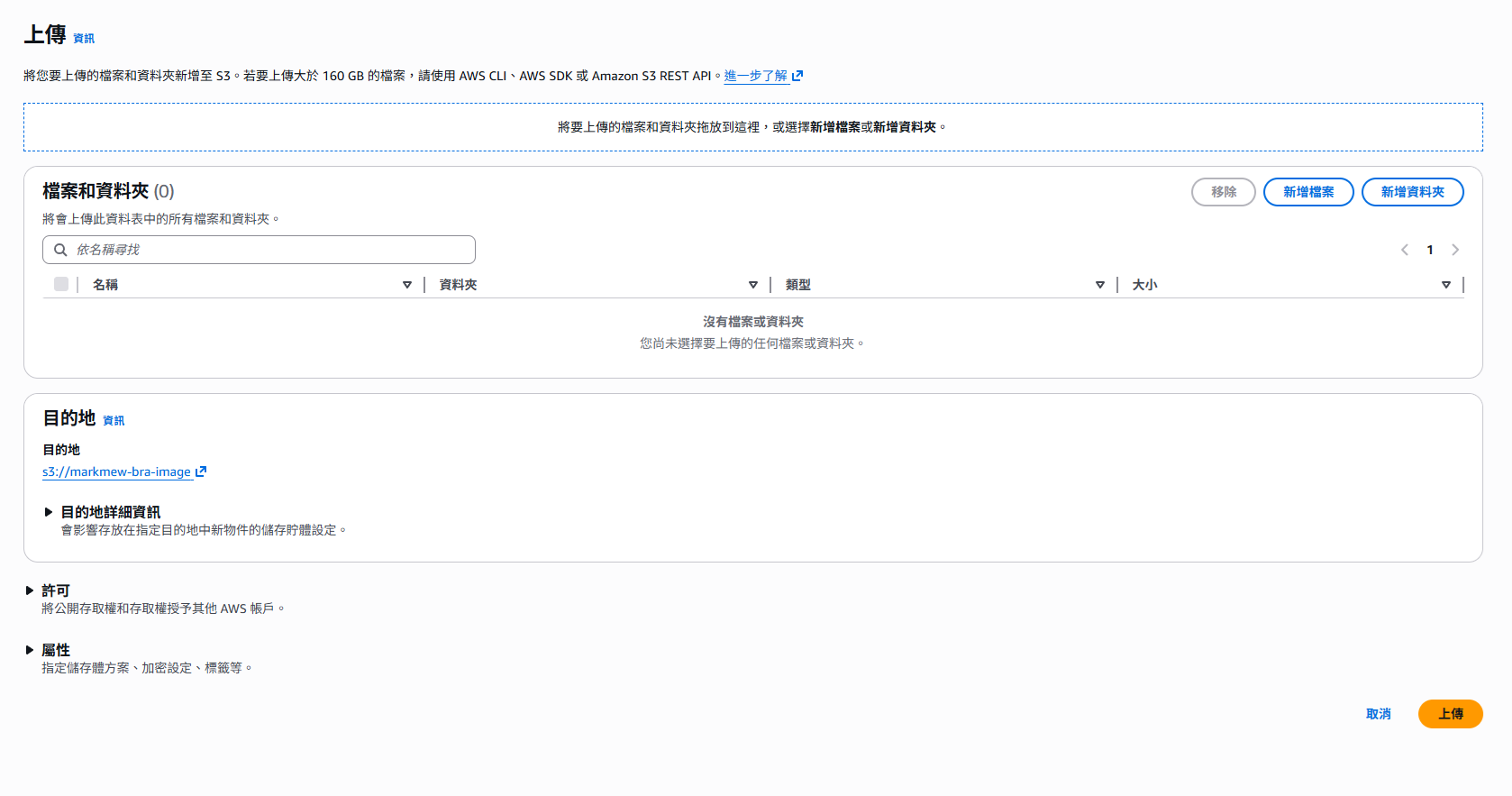
Click Add files or drag images directly into the upload panel.
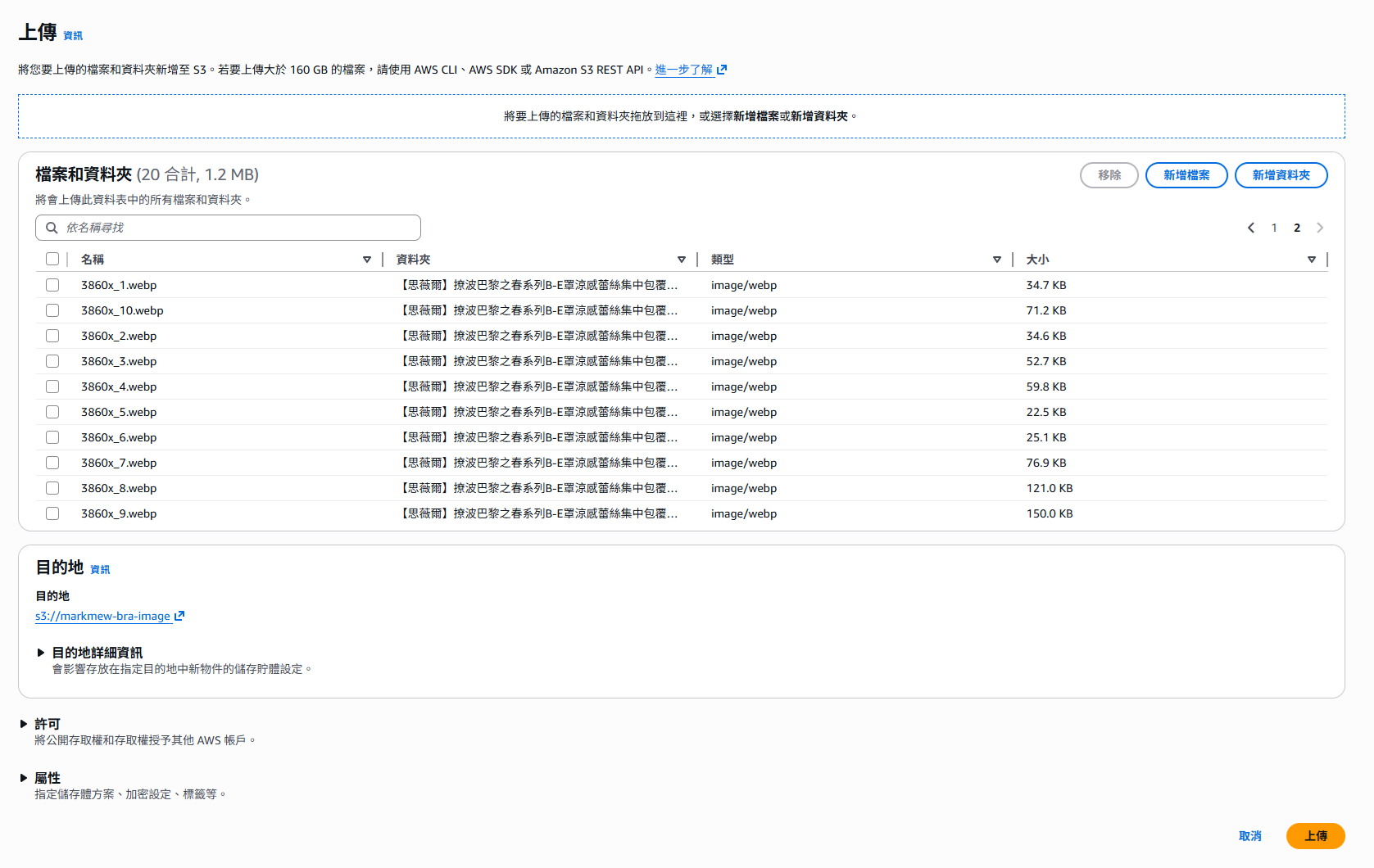
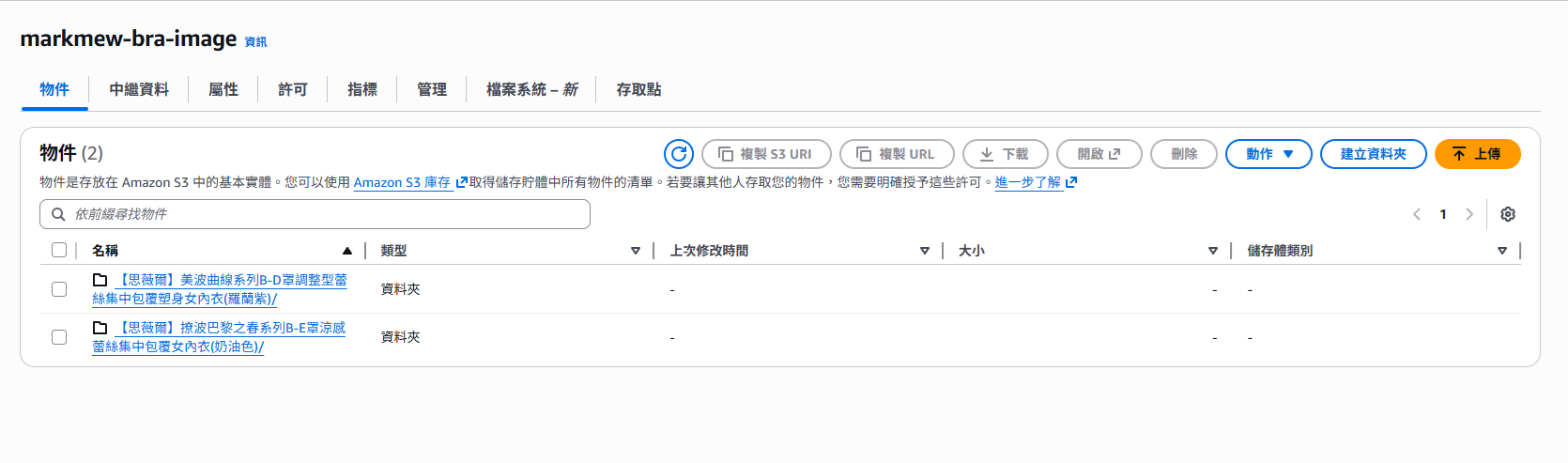
Confirm the file list and click Upload. Once completed, you should see the images in the bucket.
Step 3: Create an Index, Ingest Vectors, and Run Queries
After confirming the Vector Bucket is ready, run the following Python script. It will create an index, convert images from S3 into vectors, write vectors, and run text query tests.
1
2
3
4
5
6
7
8
9
10
11
12
13
14
15
16
17
18
19
20
21
22
23
24
25
26
27
28
29
30
31
32
33
34
35
36
37
38
39
40
41
42
43
44
45
46
47
48
49
50
51
52
53
54
55
56
57
58
59
60
61
62
63
64
65
66
67
68
69
70
71
72
73
74
75
76
77
78
79
80
81
82
83
84
85
86
87
88
89
90
91
92
93
94
95
96
97
98
99
100
101
102
103
104
105
106
107
108
109
110
111
112
113
114
115
116
117
118
119
120
121
122
123
124
125
126
127
128
129
130
131
132
133
134
135
136
137
138
139
140
141
142
143
144
145
146
147
148
149
150
151
152
153
154
155
156
157
158
159
160
161
162
163
164
165
166
167
168
169
170
171
172
173
174
175
176
177
178
179
180
181
182
183
184
185
186
187
188
189
190
191
192
193
194
195
196
197
198
199
200
201
202
203
204
205
206
207
208
209
210
211
212
213
214
215
216
217
218
219
220
221
222
223
224
225
226
227
228
229
230
231
232
233
234
235
236
237
238
239
240
241
242
243
244
245
246
247
248
249
250
251
252
253
254
255
256
257
258
259
260
261
262
263
264
265
266
267
268
269
270
271
272
273
274
275
276
277
278
279
280
281
282
283
284
import boto3
import base64
import json

# --- Configuration ---
S3_REGION = 'ap-northeast-1'
BEDROCK_REGION = 'us-east-1'  # Nova is only available in us-east-1
S3_VECTORS_REGION = 'ap-northeast-1'

IMAGE_BUCKET_NAME = 'markmew-bra-image'
VECTOR_BUCKET_NAME = 'markmew-s3-vector'
NOVA_INDEX_NAME = 'bra-nova-multimodal-1024-cosine'
EMBEDDING_DIMENSION = 1024

# Create clients
s3_client = boto3.client('s3', region_name=S3_REGION)
bedrock_runtime_client = boto3.client('bedrock-runtime', region_name=BEDROCK_REGION)
s3_vectors_client = boto3.client('s3vectors', region_name=S3_VECTORS_REGION)

def create_nova_multimodal_index():
    """Create Nova multimodal vector index"""
    try:
        s3_vectors_client.get_index(
            vectorBucketName=VECTOR_BUCKET_NAME,
            indexName=NOVA_INDEX_NAME
        )
        print(f"✅ Nova multimodal index {NOVA_INDEX_NAME} already exists")
    except Exception:
        print(f"🚀 Creating Nova multimodal index...")
        s3_vectors_client.create_index(
            vectorBucketName=VECTOR_BUCKET_NAME,
            indexName=NOVA_INDEX_NAME,
            dimension=EMBEDDING_DIMENSION,
            dataType='float32',
            distanceMetric='cosine'
        )
        print(f"✅ Nova multimodal index created")

def process_images_with_nova_fixed():
    """Process images with corrected Nova API format"""
    print("🚀 Processing images with Amazon Nova Multimodal Embeddings (corrected API format)...")

    paginator = s3_client.get_paginator('list_objects_v2')
    pages = paginator.paginate(Bucket=IMAGE_BUCKET_NAME)

    count = 0
    vectors_batch = []

    for page in pages:
        if 'Contents' not in page:
            continue

        for obj in page['Contents']:
            key = obj['Key']
            if not key.lower().endswith(('.png', '.jpg', '.jpeg', '.webp')):
                continue

            print(f"Processing: {key}")

            try:
                # 1. Read image
                image_obj = s3_client.get_object(Bucket=IMAGE_BUCKET_NAME, Key=key)
                image_bytes = image_obj['Body'].read()

                if len(image_bytes) > 25 * 1024 * 1024:
                    print(f"   ↳ ⚠️  Skipped: image size exceeds 25MB")
                    continue

                # 2. Use correct Nova API format
                request_body = {
                    "taskType": "SINGLE_EMBEDDING",
                    "singleEmbeddingParams": {
                        "embeddingPurpose": "GENERIC_INDEX",  # Required parameter
                        "embeddingDimension": EMBEDDING_DIMENSION,
                        "image": {
                            "format": "webp" if key.lower().endswith('.webp') else "jpeg",
                            "source": {
                                "bytes": base64.b64encode(image_bytes).decode('utf-8')
                            }
                        }
                    }
                }

                response = bedrock_runtime_client.invoke_model(
                    modelId="amazon.nova-2-multimodal-embeddings-v1:0",
                    body=json.dumps(request_body),
                    contentType="application/json"
                )

                response_data = json.loads(response['body'].read())
                vector = response_data['embeddings'][0]['embedding']

                # 3. Prepare vector payload
                vector_data = {
                    "key": f"nova-{count}",
                    "data": {"float32": vector},
                    "metadata": {
                        's3_uri': f's3://{IMAGE_BUCKET_NAME}/{key}',
                        'original_filename': key,
                        'type': 'nova_multimodal'
                    }
                }
                vectors_batch.append(vector_data)

                print(f"   ↳ ✅ Nova vector generation succeeded (ID: nova-{count})")
                count += 1

                # Batch insert
                if len(vectors_batch) >= 50:
                    s3_vectors_client.put_vectors(
                        vectorBucketName=VECTOR_BUCKET_NAME,
                        indexName=NOVA_INDEX_NAME,
                        vectors=vectors_batch
                    )
                    print(f"   ↳ 📦 Successfully inserted {len(vectors_batch)} vectors in batch")
                    vectors_batch = []

            except Exception as e:
                print(f"   ↳ ❌ Error: {e}")

    # Process remaining vectors
    if vectors_batch:
        s3_vectors_client.put_vectors(
            vectorBucketName=VECTOR_BUCKET_NAME,
            indexName=NOVA_INDEX_NAME,
            vectors=vectors_batch
        )
        print(f"📦 Inserted final {len(vectors_batch)} vectors in batch")

    print(f"\n🎉 Nova processing completed! Total images processed: {count}")

def query_by_text_with_nova_fixed(search_text, top_k=5):
    """Run text query with corrected Nova API format"""
    try:
        print(f"🔍 Running Nova text query: {search_text}")

        # Use correct API format
        request_body = {
            "taskType": "SINGLE_EMBEDDING",
            "singleEmbeddingParams": {
                "embeddingPurpose": "GENERIC_RETRIEVAL",  # Use RETRIEVAL for query
                "embeddingDimension": EMBEDDING_DIMENSION,
                "text": {
                    "truncationMode": "END",
                    "value": search_text
                }
            }
        }

        response = bedrock_runtime_client.invoke_model(
            modelId="amazon.nova-2-multimodal-embeddings-v1:0",
            body=json.dumps(request_body),
            contentType="application/json"
        )

        response_data = json.loads(response['body'].read())
        query_vector = response_data['embeddings'][0]['embedding']

        # Search
        search_response = s3_vectors_client.query_vectors(
            vectorBucketName=VECTOR_BUCKET_NAME,
            indexName=NOVA_INDEX_NAME,
            queryVector={"float32": query_vector},
            topK=top_k,
            returnDistance=True,
            returnMetadata=True
        )

        print(f"📊 Nova Text Search Results:")
        print("-" * 80)

        for i, result in enumerate(search_response['vectors']):
            distance = result.get('distance', 0)
            similarity = (1 - distance) * 100
            s3_uri = result['metadata'].get('s3_uri', 'N/A')
            filename = result['metadata'].get('original_filename', 'N/A')

            print(f"{i+1:2d}. Similarity: {similarity:6.2f}%")
            print(f"     File: {filename}")
            print(f"     Path: {s3_uri}")
            print()

        return search_response

    except Exception as e:
        print(f"❌ Nova text query failed: {e}")
        return None

def query_by_image_with_nova_fixed(image_key, top_k=5):
    """Run image query with corrected Nova API format"""
    try:
        print(f"🔍 Performing image query with Nova: {image_key}")

        # Read image
        image_obj = s3_client.get_object(Bucket=IMAGE_BUCKET_NAME, Key=image_key)
        image_bytes = image_obj['Body'].read()

        # Use correct API format
        request_body = {
            "taskType": "SINGLE_EMBEDDING",
            "singleEmbeddingParams": {
                "embeddingPurpose": "GENERIC_RETRIEVAL",  # Use RETRIEVAL for query
                "embeddingDimension": EMBEDDING_DIMENSION,
                "image": {
                    "format": "webp" if image_key.lower().endswith('.webp') else "jpeg",
                    "source": {
                        "bytes": base64.b64encode(image_bytes).decode('utf-8')
                    }
                }
            }
        }

        response = bedrock_runtime_client.invoke_model(
            modelId="amazon.nova-2-multimodal-embeddings-v1:0",
            body=json.dumps(request_body),
            contentType="application/json"
        )

        response_data = json.loads(response['body'].read())
        query_vector = response_data['embeddings'][0]['embedding']

        # Search similar images
        search_response = s3_vectors_client.query_vectors(
            vectorBucketName=VECTOR_BUCKET_NAME,
            indexName=NOVA_INDEX_NAME,
            queryVector={"float32": query_vector},
            topK=top_k,
            returnDistance=True,
            returnMetadata=True
        )

        print(f"📊 Nova Image Search Results:")
        print("-" * 80)

        for i, result in enumerate(search_response['vectors']):
            distance = result.get('distance', 0)
            similarity = (1 - distance) * 100
            s3_uri = result['metadata'].get('s3_uri', 'N/A')
            filename = result['metadata'].get('original_filename', 'N/A')

            print(f"{i+1:2d}. Similarity: {similarity:6.2f}%")
            print(f"     File: {filename}")
            print(f"     Path: {s3_uri}")
            print()

        return search_response

    except Exception as e:
        print(f"❌ Nova image query failed: {e}")
        return None

if __name__ == "__main__":
    print("🚀 Using corrected Nova Multimodal Embeddings API")
    print("=" * 70)

    # 1. Create index
    create_nova_multimodal_index()

    print("\n" + "=" * 70)

    # 2. Process images
    process_images_with_nova_fixed()

    print("\n" + "=" * 70)

    # 3. Test text query
    print("🔍 Test Nova text query:")

    test_queries = [
        "purple lingerie",
        "lace bra",
        "cream-colored lingerie",
        "shaping bra"
    ]

    for query in test_queries:
        print(f"\n--- Query: {query} ---")
        query_by_text_with_nova_fixed(query, top_k=3)

    print("\n" + "=" * 70)

    # 4. Test image query (optional)
    # print("🔍 Test Nova image query:")
    # query_by_image_with_nova_fixed("your-image-file.webp", top_k=3)
After running the script,
we can clearly see the execution result for each image.
Using purple lingerie as an example,
the results clearly return products from the purple folder,
instead of items in the cream-color folder.
The dataset is small,
but the result is still reasonably accurate.
1
2
3
4
5
6
7
8
9
10
11
12
13
14
15
16
17
18
19
20
21
22
23
24
25
26
27
28
29
30
31
32
33
34
35
36
37
38
39
40
41
42
43
44
45
46
47
48
49
50
51
52
53
54
55
56
57
58
59
60
61
62
63
64
65
66
67
68
69
70
71
72
73
74
75
76
77
78
79
80
81
82
83
84
85
86
87
88
89
90
91
92
93
94
95
96
97
98
99
100
101
102
103
104
105
106
107
108
109
110
111
112
113
114
115
116
117
118
119
120
121
122
123
124
125
~ $ python query_similar_images.py
/usr/local/lib/python3.9/site-packages/boto3/compat.py:89: PythonDeprecationWarning: Boto3 will no longer support Python 3.9 starting April 29, 2026. To continue receiving service updates, bug fixes, and security updates please upgrade to Python 3.10 or later. More information can be found here: https://aws.amazon.com/blogs/developer/python-support-policy-updates-for-aws-sdks-and-tools/
  warnings.warn(warning, PythonDeprecationWarning)
🚀 Using corrected Nova Multimodal Embeddings API
======================================================================
✅ Nova multimodal index bra-nova-multimodal-1024-cosine already exists

======================================================================
🚀 Processing images with Amazon Nova Multimodal Embeddings (corrected API format)...
Processing: 【思薇爾】撩波巴黎之春系列B-E罩涼感蕾絲集中包覆女內衣(奶油色)/3860x_1.webp
   ↳ ✅ Nova vector generation succeeded (ID: nova-0)
Processing: 【思薇爾】撩波巴黎之春系列B-E罩涼感蕾絲集中包覆女內衣(奶油色)/3860x_10.webp
   ↳ ✅ Nova vector generation succeeded (ID: nova-1)
Processing: 【思薇爾】撩波巴黎之春系列B-E罩涼感蕾絲集中包覆女內衣(奶油色)/3860x_2.webp
   ↳ ✅ Nova vector generation succeeded (ID: nova-2)
Processing: 【思薇爾】撩波巴黎之春系列B-E罩涼感蕾絲集中包覆女內衣(奶油色)/3860x_3.webp
   ↳ ✅ Nova vector generation succeeded (ID: nova-3)
Processing: 【思薇爾】撩波巴黎之春系列B-E罩涼感蕾絲集中包覆女內衣(奶油色)/3860x_4.webp
   ↳ ✅ Nova vector generation succeeded (ID: nova-4)
Processing: 【思薇爾】撩波巴黎之春系列B-E罩涼感蕾絲集中包覆女內衣(奶油色)/3860x_5.webp
   ↳ ✅ Nova vector generation succeeded (ID: nova-5)
Processing: 【思薇爾】撩波巴黎之春系列B-E罩涼感蕾絲集中包覆女內衣(奶油色)/3860x_6.webp
   ↳ ✅ Nova vector generation succeeded (ID: nova-6)
Processing: 【思薇爾】撩波巴黎之春系列B-E罩涼感蕾絲集中包覆女內衣(奶油色)/3860x_7.webp
   ↳ ✅ Nova vector generation succeeded (ID: nova-7)
Processing: 【思薇爾】撩波巴黎之春系列B-E罩涼感蕾絲集中包覆女內衣(奶油色)/3860x_8.webp
   ↳ ✅ Nova vector generation succeeded (ID: nova-8)
Processing: 【思薇爾】撩波巴黎之春系列B-E罩涼感蕾絲集中包覆女內衣(奶油色)/3860x_9.webp
   ↳ ✅ Nova vector generation succeeded (ID: nova-9)
Processing: 【思薇爾】美波曲線系列B-D罩調整型蕾絲集中包覆塑身女內衣(羅蘭紫)/3860x_1.webp
   ↳ ✅ Nova vector generation succeeded (ID: nova-10)
Processing: 【思薇爾】美波曲線系列B-D罩調整型蕾絲集中包覆塑身女內衣(羅蘭紫)/3860x_10.webp
   ↳ ✅ Nova vector generation succeeded (ID: nova-11)
Processing: 【思薇爾】美波曲線系列B-D罩調整型蕾絲集中包覆塑身女內衣(羅蘭紫)/3860x_2.webp
   ↳ ✅ Nova vector generation succeeded (ID: nova-12)
Processing: 【思薇爾】美波曲線系列B-D罩調整型蕾絲集中包覆塑身女內衣(羅蘭紫)/3860x_3.webp
   ↳ ✅ Nova vector generation succeeded (ID: nova-13)
Processing: 【思薇爾】美波曲線系列B-D罩調整型蕾絲集中包覆塑身女內衣(羅蘭紫)/3860x_4.webp
   ↳ ✅ Nova vector generation succeeded (ID: nova-14)
Processing: 【思薇爾】美波曲線系列B-D罩調整型蕾絲集中包覆塑身女內衣(羅蘭紫)/3860x_5.webp
   ↳ ✅ Nova vector generation succeeded (ID: nova-15)
Processing: 【思薇爾】美波曲線系列B-D罩調整型蕾絲集中包覆塑身女內衣(羅蘭紫)/3860x_6.webp
   ↳ ✅ Nova vector generation succeeded (ID: nova-16)
Processing: 【思薇爾】美波曲線系列B-D罩調整型蕾絲集中包覆塑身女內衣(羅蘭紫)/3860x_7.webp
   ↳ ✅ Nova vector generation succeeded (ID: nova-17)
Processing: 【思薇爾】美波曲線系列B-D罩調整型蕾絲集中包覆塑身女內衣(羅蘭紫)/3860x_8.webp
   ↳ ✅ Nova vector generation succeeded (ID: nova-18)
Processing: 【思薇爾】美波曲線系列B-D罩調整型蕾絲集中包覆塑身女內衣(羅蘭紫)/3860x_9.webp
   ↳ ✅ Nova vector generation succeeded (ID: nova-19)
📦 Inserted final 20 vectors in batch

🎉 Nova processing completed! Total images processed: 20

======================================================================
🔍 Test Nova text query:

--- Query: purple lingerie ---
🔍 Running Nova text query: purple lingerie
📊 Nova Text Search Results:
--------------------------------------------------------------------------------
 1. Similarity:  40.29%
     File: 【思薇爾】美波曲線系列B-D罩調整型蕾絲集中包覆塑身女內衣(羅蘭紫)/3860x_8.webp
     Path: s3://markmew-bra-image/【思薇爾】美波曲線系列B-D罩調整型蕾絲集中包覆塑身女內衣(羅蘭紫)/3860x_8.webp

 2. Similarity:  38.02%
     File: 【思薇爾】美波曲線系列B-D罩調整型蕾絲集中包覆塑身女內衣(羅蘭紫)/3860x_9.webp
     Path: s3://markmew-bra-image/【思薇爾】美波曲線系列B-D罩調整型蕾絲集中包覆塑身女內衣(羅蘭紫)/3860x_9.webp

 3. Similarity:  34.87%
     File: 【思薇爾】美波曲線系列B-D罩調整型蕾絲集中包覆塑身女內衣(羅蘭紫)/3860x_4.webp
     Path: s3://markmew-bra-image/【思薇爾】美波曲線系列B-D罩調整型蕾絲集中包覆塑身女內衣(羅蘭紫)/3860x_4.webp


--- Query: lace bra ---
🔍 Running Nova text query: lace bra
📊 Nova Text Search Results:
--------------------------------------------------------------------------------
 1. Similarity:  41.13%
     File: 【思薇爾】美波曲線系列B-D罩調整型蕾絲集中包覆塑身女內衣(羅蘭紫)/3860x_9.webp
     Path: s3://markmew-bra-image/【思薇爾】美波曲線系列B-D罩調整型蕾絲集中包覆塑身女內衣(羅蘭紫)/3860x_9.webp

 2. Similarity:  39.92%
     File: 【思薇爾】美波曲線系列B-D罩調整型蕾絲集中包覆塑身女內衣(羅蘭紫)/3860x_1.webp
     Path: s3://markmew-bra-image/【思薇爾】美波曲線系列B-D罩調整型蕾絲集中包覆塑身女內衣(羅蘭紫)/3860x_1.webp

 3. Similarity:  39.53%
     File: 【思薇爾】美波曲線系列B-D罩調整型蕾絲集中包覆塑身女內衣(羅蘭紫)/3860x_4.webp
     Path: s3://markmew-bra-image/【思薇爾】美波曲線系列B-D罩調整型蕾絲集中包覆塑身女內衣(羅蘭紫)/3860x_4.webp


--- Query: cream-colored lingerie ---
🔍 Running Nova text query: cream-colored lingerie
📊 Nova Text Search Results:
--------------------------------------------------------------------------------
 1. Similarity:  46.78%
     File: 【思薇爾】撩波巴黎之春系列B-E罩涼感蕾絲集中包覆女內衣(奶油色)/3860x_7.webp
     Path: s3://markmew-bra-image/【思薇爾】撩波巴黎之春系列B-E罩涼感蕾絲集中包覆女內衣(奶油色)/3860x_7.webp

 2. Similarity:  46.66%
     File: 【思薇爾】撩波巴黎之春系列B-E罩涼感蕾絲集中包覆女內衣(奶油色)/3860x_4.webp
     Path: s3://markmew-bra-image/【思薇爾】撩波巴黎之春系列B-E罩涼感蕾絲集中包覆女內衣(奶油色)/3860x_4.webp

 3. Similarity:  45.41%
     File: 【思薇爾】美波曲線系列B-D罩調整型蕾絲集中包覆塑身女內衣(羅蘭紫)/3860x_9.webp
     Path: s3://markmew-bra-image/【思薇爾】美波曲線系列B-D罩調整型蕾絲集中包覆塑身女內衣(羅蘭紫)/3860x_9.webp


--- Query: shaping bra ---
🔍 Running Nova text query: shaping bra
📊 Nova Text Search Results:
--------------------------------------------------------------------------------
 1. Similarity:  54.27%
     File: 【思薇爾】美波曲線系列B-D罩調整型蕾絲集中包覆塑身女內衣(羅蘭紫)/3860x_10.webp
     Path: s3://markmew-bra-image/【思薇爾】美波曲線系列B-D罩調整型蕾絲集中包覆塑身女內衣(羅蘭紫)/3860x_10.webp

 2. Similarity:  53.83%
     File: 【思薇爾】美波曲線系列B-D罩調整型蕾絲集中包覆塑身女內衣(羅蘭紫)/3860x_9.webp
     Path: s3://markmew-bra-image/【思薇爾】美波曲線系列B-D罩調整型蕾絲集中包覆塑身女內衣(羅蘭紫)/3860x_9.webp

 3. Similarity:  52.88%
     File: 【思薇爾】撩波巴黎之春系列B-E罩涼感蕾絲集中包覆女內衣(奶油色)/3860x_9.webp
     Path: s3://markmew-bra-image/【思薇爾】撩波巴黎之春系列B-E罩涼感蕾絲集中包覆女內衣(奶油色)/3860x_9.webp


======================================================================
Conclusion
S3 Vector Bucket is a lightweight vector storage option introduced by AWS in the AI era.
For smaller workloads and rapid validation,
you can complete the full flow from image upload to vector ingestion and similarity query
without operating additional vector databases such as Pinecone, Weaviate, or OpenSearch.
As mentioned earlier,
S3 Vector Bucket currently does not provide advanced capabilities such as full-text indexing or rich scoring.
If your data volume grows or query requirements become more complex,
moving to a dedicated vector database is the natural next step.
A practical approach is to position S3 Vector Bucket as a PoC or low-traffic staging layer.
References: